
Newsletter
Stay Updated
Subscribe to FrontendGeek Hub for frontend interview preparation, interview experiences, curated resources and roadmaps.
Newsletter
Subscribe to FrontendGeek Hub for frontend interview preparation, interview experiences, curated resources and roadmaps.
Social Tools
Estimate YouTube ad earnings from views, CPM, CTR, and an optional estimate multiplier. Toggle per-video or per-month views and project monthly or yearly revenue.
Related
Overview
A YouTube Earnings Calculator estimates ad income from views, CPM, and CTR so creators can model per-video or monthly revenue scenarios. Real payouts vary by niche, geography, and seasonality.
How to use
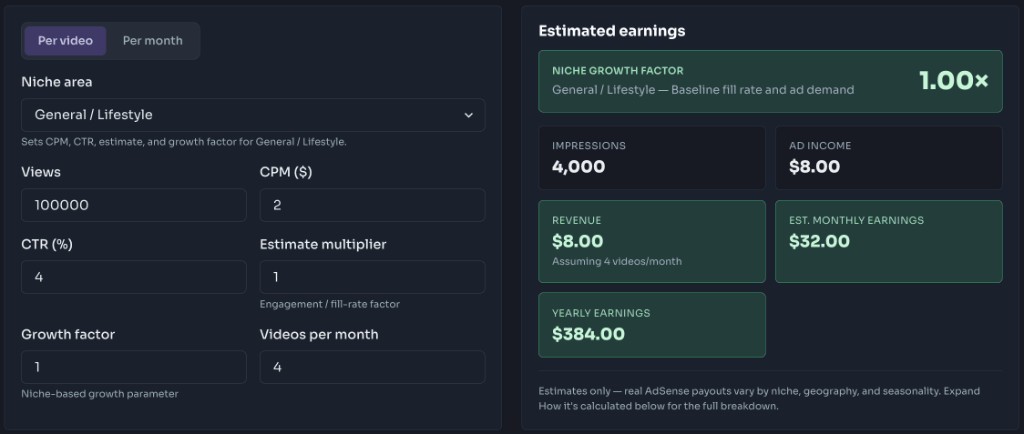
Add views, CPM (default $2), CTR % (default 4), and optional estimate multiplier.
Select whether views are per video or per month. For per video, set uploads per month.
Review ad income, revenue, and monthly/yearly projections. Treat results as estimates only.
Why use it
Model ad income from target views, CPM, CTR, and niche growth so you know a realistic payout range for one video.
Switch to per-video mode, set uploads per month, and project monthly and yearly revenue for your publishing cadence.
Pick different niche areas to see how CPM, CTR, and growth factors change estimated revenue.
Use ad revenue estimates as a baseline when deciding whether a sponsorship offer is stronger than AdSense alone.
Project daily, monthly, or yearly income ranges so channel goals stay grounded in niche-aware estimates.
Features
Model revenue from views, CPM, and CTR
Optional estimate / engagement multiplier
Per-video or per-month view modes
Monthly and yearly projections
Transparent formula shown in the UI
FAQ
Quick answers about YouTube Earnings Calculator.
It varies widely by niche, country, and season. Many channels see roughly $0.25–$4+ per 1,000 views after YouTube’s share (often discussed as RPM), while CPM (what advertisers pay) is usually higher. Use this calculator to model scenarios—not as a guaranteed payout.
Guides
Step-by-step Instant Download help, format comparisons, and troubleshooting from the Tools Guide.
Help others discover this free tool
Explore
Baseline fill rate and ad demand. Selecting a niche updates CPM, CTR, estimate, and growth — you can still fine-tune them below.
Based on the selected niche common growth factor.
Est. monthly earnings
$32.00
Likely range $22.40 – $43.20
Assuming 4 videos/month
Estimates only — real AdSense payouts vary by niche, geography, seasonality, memberships, Super Thanks, and Shorts revenue share.
toolsandcalcs.com · YouTube Earnings Calculator