
HEX to RGB Converter Online
Convert HEX to RGB color code values instantly using this online HEX to RGB converter. Free online tool for web developers and designers to convert hexadecimal colors to RGB and RGBA formats in a single click.
Click the color picker icon to open the palette and select a color visually.
RGB
rgb(255, 87, 51)Red: 255, Green: 87, Blue: 51
RGBA
rgba(255, 87, 51, 1)How to Use HEX to RGB Converter
Our HEX to RGB converter is simple and intuitive. Follow these steps to convert your color codes and get accurate RGB values for your web development projects.
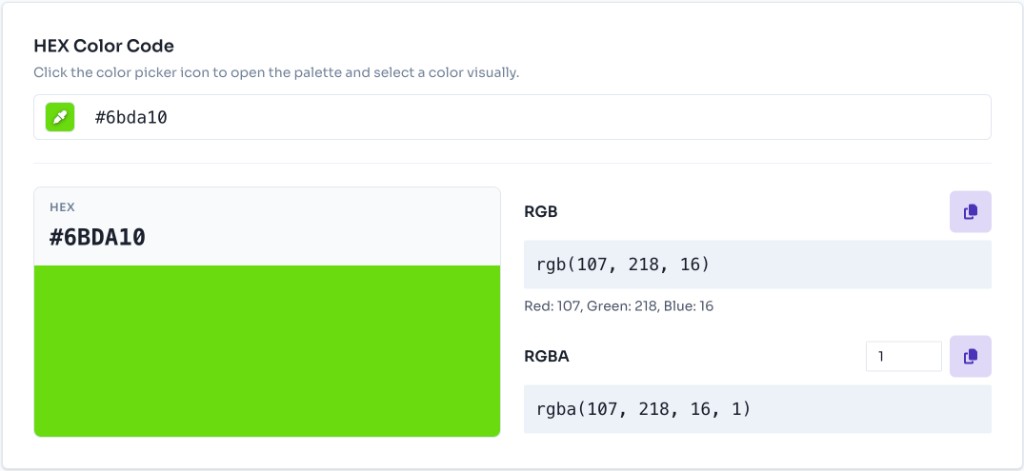
Enter Your HEX Color Code
Type your HEX color code in the input field at the top of the converter. You can enter it with or without the # symbol. The converter accepts both 3-digit (e.g., #f73) and 6-digit (e.g., #ff7733) hex codes. The conversion happens instantly as you type.

View RGB and RGBA Values
Once you enter a valid HEX code, the converter automatically displays the corresponding RGB value. You'll see the red, green, and blue values (each ranging from 0-255) in the RGB format. The RGBA value is also shown, which includes an alpha channel for transparency control.
Adjust Alpha Channel
Use the alpha channel input to adjust transparency for RGBA values. The alpha value ranges from 0.0 (fully transparent) to 1.0 (fully opaque). This is particularly useful when you need semi-transparent colors for overlays, shadows, or modern UI effects.

Copy Your RGB Values
Click the copy button next to the RGB or RGBA value to instantly copy it to your clipboard. You can then paste the color value directly into your CSS, JavaScript, or any other code that requires RGB color format. The converter provides both rgb() and rgba() formats ready to use.
How HEX to RGB Conversion Works
HEX (hexadecimal) and RGB (Red, Green, Blue) are two different ways to represent colors in web development. Understanding how the conversion works helps you work more effectively with colors in your projects.
HEX Format (Hexadecimal)
HEX color codes use base-16 (hexadecimal) notation with values from 0-9 and A-F. Each pair of hex digits represents one color channel. For example, in #FF5733, FF represents red, 57 represents green, and 33 represents blue. HEX format is compact and widely used in web design and CSS.
RGB Format (Decimal)
RGB uses decimal notation with values from 0-255 for each color channel. Each hex pair is converted to its decimal equivalent. For example, #FF5733 converts to RGB(255, 87, 51) where FF (hex) = 255 (decimal), 57 (hex) = 87 (decimal), and 33 (hex) = 51 (decimal).
The Conversion Process
Our converter automatically handles the mathematical conversion from hexadecimal to decimal. Each pair of hex digits (RR, GG, BB) is converted to its decimal equivalent using base-16 arithmetic. The converter also supports 3-digit hex codes by expanding them to 6 digits (e.g., #F73 becomes #FF7733).
JavaScript Implementation
You can convert HEX to RGB in JavaScript using parseInt with base 16. This is the same approach our online converter uses behind the scenes:
For more technical details, refer to the MDN documentation on CSS color values and the RGB color function.
What is HEX, RGB and RGBA?
HEX, RGB, and RGBA are the most common ways to define colors in CSS and web development. Each format represents the same colors differently — understanding all three helps you pick the right one for design tools, stylesheets, and JavaScript.
HEX (Hexadecimal) Color Format
HEX color codes use hexadecimal notation — a hash symbol (#) followed by 3 or 6 digits (0–9 and A–F). Each pair of digits maps to a color channel: red, green, and blue. HEX is compact and widely used in design tools and CSS (e.g., #FF5733 or #F73). It is case-insensitive, so #ff5733 and #FF5733 are identical. Learn more about HEX color values on MDN.
RGB (Red, Green, Blue) Color Format
RGB expresses colors as three decimal values from 0 to 255 — one each for red, green, and blue. It is more intuitive than HEX for reading channel values and for programmatic color math in JavaScript or design systems. In CSS, use the rgb() function: rgb(255, 87, 51). Learn more about the RGB color function on MDN.
RGBA (Red, Green, Blue, Alpha) Color Format
RGBA extends RGB with a fourth value — alpha — that controls opacity from 0.0 (fully transparent) to 1.0 (fully opaque). Use RGBA when you need semi-transparent overlays, glass effects, shadows, or any color that blends with content behind it. In CSS: rgba(255, 87, 51, 0.5) is 50% opaque orange-red. Our converter lets you adjust the alpha slider and copy the ready-to-use rgba() string directly.
Benefits of Using RGB over HEX
While both HEX and RGB are valid color formats, RGB offers several advantages in certain scenarios for web development and design.
- Transparency Support: RGBA format natively supports alpha channel for transparency, making it easier to create semi-transparent colors without additional CSS properties. This is particularly useful for overlays, modals, and modern UI effects that require transparency.
- Programmatic Manipulation: RGB values are easier to manipulate programmatically. You can easily adjust individual color channels, create gradients, perform color calculations, or dynamically generate color variations in JavaScript. This makes RGB ideal for interactive color tools and dynamic styling.
- Better Readability: RGB format is more intuitive for understanding color composition. You can immediately see the red, green, and blue values without mental conversion from hexadecimal. This makes it easier to predict color outcomes and make adjustments.
- Dynamic Color Generation: RGB is ideal for generating colors dynamically in JavaScript, creating color palettes, implementing color pickers with sliders, or building theme systems. The decimal format makes mathematical operations on colors straightforward.
Note: Both formats are valid and widely supported. Choose based on your specific needs. HEX is more compact and commonly used in design tools, while RGB is better for programmatic color manipulation. For CSS color values, refer to the MDN CSS color documentation.
Frequently Asked Questions - FAQs
Can I convert 3-digit HEX codes?
Yes! Our converter supports both 3-digit (e.g., #f73) and 6-digit (e.g., #ff7733) HEX codes. The 3-digit format is automatically expanded to 6 digits by duplicating each character.
What is the difference between RGB and RGBA?
RGB represents colors with three values (red, green, blue) ranging from 0-255. RGBA adds a fourth value called alpha, which controls transparency (0.0 = fully transparent, 1.0 = fully opaque). RGBA is useful for creating semi-transparent colors.
Is this converter free to use?
Yes, our HEX to RGB converter is completely free to use. There are no limitations, no registration required, and no hidden fees. Use it as much as you need for your web development projects.
Can I use RGB values in CSS?
Absolutely! RGB and RGBA are fully supported in CSS. You can use them in any CSS property that accepts color values, such as background-color, color, border-color, etc. Both formats are equivalent and widely supported by all modern browsers.
More Tools
Discover more free tools to boost your productivity
Gradient
Blog Post
Transform your content...
Social Post
Sample Text
✓
WCAG AA: Pass
21:1
