
🚀 AI SaaS Starter is now live!

50% OFF

Use code FIRST50

Back to Tools
CSS TOOL

Animated Gradient Background Generator

Use our Animated Gradient Background Generator to create stunning animated gradient backgrounds with 30+ animation effects. Generate CSS and Tailwind code with live preview and instant code generation.

  • Gradient Generator

Live Preview

Smooth Flow

Animated Gradient

Configuration

Lower values = faster animation. Recommended: 5-15s for smooth, professional effects.

Controls gradient pattern scale. Larger values create smoother, more subtle movement. Recommended: 200-300% for best results.

%

%

CSS Code

.animated-gradient { background: linear-gradient(90deg, #667eea 0%, #764ba2 100%); background-size: 200% 200%; animation: animated-gradient-flow 10s cubic-bezier(0.4, 0, 0.2, 1) infinite; } @keyframes animated-gradient-flow { 0% { background-position: 0% 50%; } 50% { background-position: 100% 50%; } 100% { background-position: 0% 50%; } }

36+ Effects and Presets

Click on any preset below to apply it. The preview and configuration will update automatically.

How to Use Animated Gradient Background Generator

Our Animated Gradient Background Generator is a powerful tool that allows you to create stunning animated gradient backgrounds for your web projects. Here's how to use it:

Choose a Preset or Start Fresh

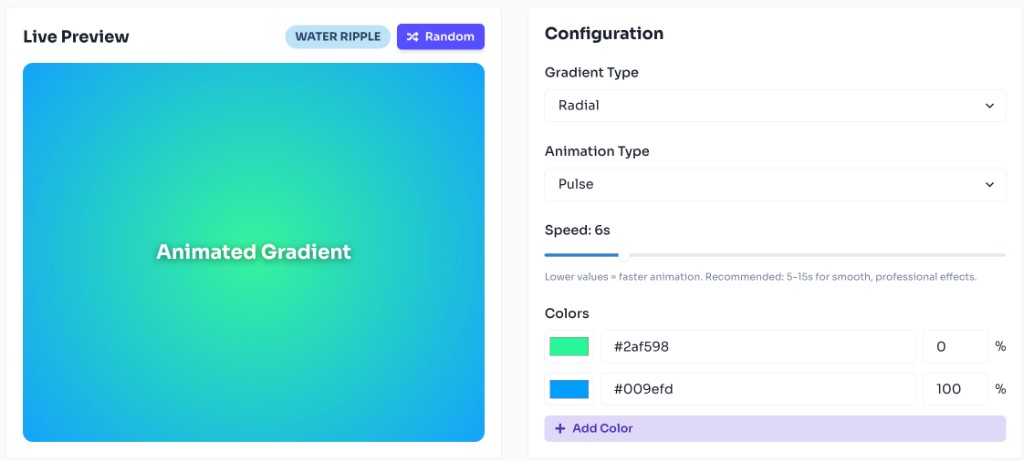
Browse our curated animation presets section. Click any preset like Smooth Flow, Wave Motion, or Radial Pulse to instantly apply professional animated gradient effects. Each preset comes with pre-configured colors, animation type, and speed. Or start with the default gradient and customize every aspect using the controls.

Customize Colors

Add, remove, or modify colors in your gradient. Use the color picker or enter hex codes directly. Adjust color positions using the percentage slider. You can add unlimited colors to create complex, multi-color animated gradients.
Select Animation Type

Choose from seven subtle animation types - Flow, Wave, Pulse, Shimmer, Aurora, Prism, or Crystal Shine - each creating a unique visual effect perfect for websites and web applications. Flow creates a smooth moving gradient, Wave provides a gentle oscillating motion, Pulse creates a breathing effect, Shimmer adds a shine effect, Aurora creates a dreamy flowing effect, Prism adds subtle color shifting, and Crystal Shine provides an elegant shimmer.

Adjust Speed and Size

Control the animation speed using the speed slider (1-30 seconds). Lower values create faster animations. For Flow, Wave, Shimmer, Aurora, Prism, and Crystal Shine animations, adjust the background size to control the pattern scale and movement intensity. All animations are designed to be subtle and smooth, perfect for professional websites and web applications.

Preview and Copy Code

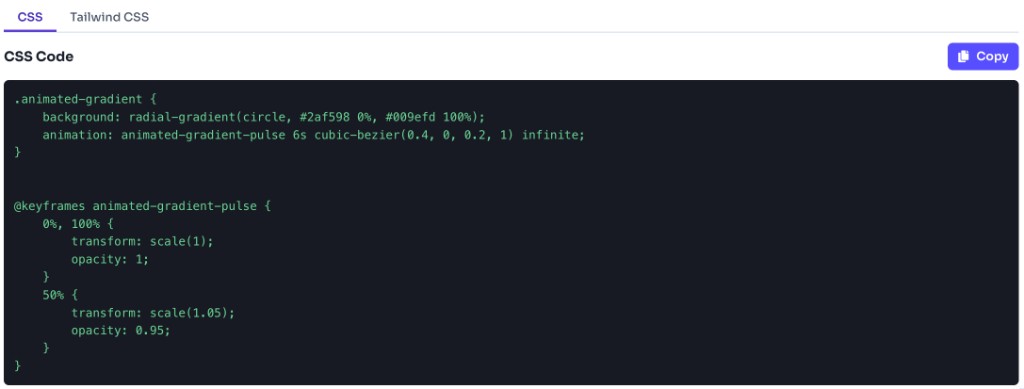
See your animated gradient in real-time in the preview area as you make changes. Once satisfied, copy the generated CSS or Tailwind code from the code section. The generator provides both standard CSS code with keyframes and Tailwind CSS configuration for easy integration into your projects.
How to Make Animated Gradient Background CSS

Creating animated gradient backgrounds in CSS involves combining CSS gradients with keyframe animations. Here's the process:

1. Define the Gradient

Start by creating a CSS gradient using linear-gradient, radial-gradient, or conic-gradient:

background: linear-gradient(90deg, #667eea 0%, #764ba2 100%);

2. Create Keyframe Animation

Define a keyframe animation that will animate the gradient position or transform:

@keyframes animated-gradient { 0% { background-position: 0% 50%; } 50% { background-position: 100% 50%; } 100% { background-position: 0% 50%; } }

3. Apply Animation

Apply the animation to your element with background-size and animation properties:

background-size: 200% 200%; animation: animated-gradient 10s ease infinite;

Animation Types Explained

The key is using background-size larger than 100% to create the movement effect, and background-position in the keyframes to animate the gradient position. Different animation types use different techniques:

  • Flow:

    Animates background-position to create a smooth flowing effect. Uses background-size larger than 100% and animates position from 0% to 100% for a subtle, continuous motion.
  • Wave:

    Similar to flow but with ease-in-out timing for smoother, more natural oscillating motion. Perfect for creating gentle, organic movement.
  • Pulse:

    Uses transform scale to create a breathing/pulsing effect. The gradient itself doesn't move, but the element scales up and down subtly, creating a calming effect.
  • Shimmer:

    Moves background-position from -200% to 200% for a shine effect that sweeps across the gradient. Creates an elegant, polished look.
  • Aurora:

    Creates a dreamy, flowing effect with smooth transitions. Uses multiple keyframe positions for a more organic, aurora-like movement that's perfect for hero sections.
  • Prism:

    Combines background-position animation with subtle hue-rotate filter for gentle color shifting. Creates a sophisticated, prism-like effect that's very subtle and professional.
  • Crystal Shine:

    A refined shimmer effect with opacity changes for a more elegant shine. Moves slower and more gracefully than standard shimmer, perfect for premium designs.

Features of Animated Gradient Background Generator

Our animated gradient background generator provides a comprehensive set of features to help you create stunning animated backgrounds for your web projects.

30+ Animation Presets

Choose from a wide variety of pre-configured animated gradients including Smooth Flow, Wave Motion, Radial Pulse, Rotating Gradient, Shimmer Effect, Aurora Borealis, Cosmic Spin, and many more. Each preset is carefully crafted for different use cases.

Custom Color Control

Add unlimited colors to your gradient, adjust their positions, and use the color picker or hex codes for precise control. Create complex multi-color gradients with ease.

7 Animation Types

Flow, Wave, Pulse, Shimmer, Aurora, Prism, and Crystal Shine - each creating unique, subtle visual effects perfect for professional websites and web applications. Ideal for hero sections, backgrounds, landing pages, and modern UI components.

Full Customization

Adjust animation speed (1-30s), background size, gradient angle, and choose between linear, radial, or conic gradients. Complete control over every aspect of your animated gradient.

Live Preview

See your animated gradient in real-time as you make changes. No need to wait or refresh to see the results. The preview updates instantly with every adjustment.

CSS & Tailwind Code

Get both CSS and Tailwind CSS code output. Copy ready-to-use code snippets with keyframe animations included. Perfect for any project setup.

Random Generator

Click the random button to instantly generate a random animated gradient for inspiration. Great for discovering new color combinations and animation styles.

Easy Export

One-click copy functionality for both CSS and Tailwind code. Share your creations with others easily. No registration or account required.

Explore Other Tools

Discover more free tools to boost your productivity

Box

CSS

Box Shadow CSS Generator Online

Create beautiful box shadow with our free box shadow css generator. Generate custom box shadow css with 60+ preset effects, live preview & instant Tailwind and CSS box shadow code.

Gradient

CSS

CSS Gradient Generator Online

Create beautiful gradient background using tailwind CSS Gradient Generator. Use 90+ presets to generate customized tailwind, CSS gradient background code quickly with live preview.

HEX: #ff5733

RGB: 255, 87, 51

HEX: #4a90e2

RGB: 74, 144, 226

CSS

HEX to RGB Converter - Free Online Color Converter Tool

Convert HEX color codes to RGB values instantly with our free HEX to RGB converter. Learn how HEX to RGB conversion works, understand color formats, and get accurate RGB values for web development.

Blog Post

Transform your content...

Social Post

AI Tools

Free AI Powered Blog to Social Media Post Generator

Transform any blog post into engaging, platform-optimized content using our Blog to Social Media Post Generator. Powered by AI to maintain your message while adapting tone and style.

View All Tools

Stay Updated

Subscribe to FrontendGeek Hub for frontend interview preparation, interview experiences, curated resources and roadmaps.

FrontendGeek
FrontendGeek

© 2025 FrontendGeek. All rights reserved