
RGB to HEX Converter Online
Convert RGB to HEX color code values instantly using this online RGB to HEX converter. Free online tool for web developers and designers to convert RGB colors to hexadecimal format in a single click.
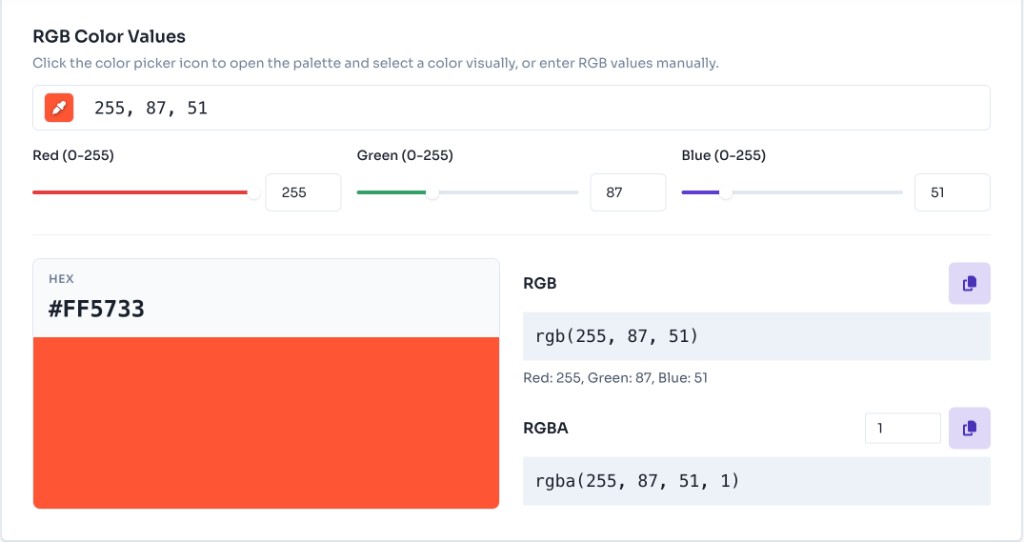
Click the color picker icon to open the palette and select a color visually, or enter RGB values manually.
RGB
rgb(255, 87, 51)Red: 255, Green: 87, Blue: 51
RGBA
rgba(255, 87, 51, 1)How to Use RGB to HEX Converter
Our RGB to HEX converter is simple and intuitive. Follow these steps to convert your color codes and get accurate HEX values for your web development projects.
Enter Your RGB Color Values
Enter RGB values using the text field, individual Red/Green/Blue sliders, or number inputs (each ranging from 0–255). You can also paste formats like "255, 87, 51" or "rgb(255, 87, 51)" — the converter updates all fields automatically.

Use the Color Picker
Click the color picker icon at the start of the input to open a visual palette. Select any color and the converter will extract the RGB values and convert them to HEX instantly.
View HEX Color Code
Once you enter valid RGB values, the converter displays the HEX color code with a live preview swatch. RGB and RGBA values are shown alongside, with an alpha slider for transparency control.

Copy Your HEX Value
Click the HEX preview card or the copy buttons next to RGB/RGBA to copy values to your clipboard. Paste directly into CSS, HTML, JavaScript, or any design tool that accepts HEX color codes.
How RGB to HEX Conversion Works
RGB (Red, Green, Blue) and HEX (hexadecimal) are two different ways to represent colors in web development. Understanding how the conversion works helps you work more effectively with colors in your projects.
RGB Format (Decimal)
RGB uses decimal notation with values from 0-255 for each color channel. For example, RGB(255, 87, 51) represents a color with maximum red (255), moderate green (87), and moderate blue (51). RGB format is intuitive and widely used in programmatic color manipulation.
HEX Format (Hexadecimal)
HEX color codes use base-16 (hexadecimal) notation with values from 0-9 and A-F. Each decimal value (0-255) is converted to its two-digit hexadecimal equivalent. For example, RGB(255, 87, 51) converts to #FF5733 where 255 (decimal) = FF (hex), 87 (decimal) = 57 (hex), and 51 (decimal) = 33 (hex).
The Conversion Process
Our converter automatically handles the mathematical conversion from decimal to hexadecimal. Each RGB value (0-255) is converted to its two-digit hex equivalent using base-16 arithmetic. The converter ensures proper formatting with leading zeros when needed (e.g., 10 becomes 0A) and always outputs uppercase hex codes for consistency.
JavaScript Implementation
You can convert RGB to HEX in JavaScript using toString(16) on each channel. This matches the logic our online converter uses:
For more technical details, refer to the MDN documentation on CSS color values and the HEX color values.
What is HEX, RGB and RGBA?
HEX, RGB, and RGBA are the most common ways to define colors in CSS and web development. Converting between them lets you move from design-tool exports (HEX) to programmatic styles (RGB/RGBA) and back.
RGB (Red, Green, Blue) Color Format
RGB expresses colors as three decimal values from 0 to 255 — one each for red, green, and blue. It is intuitive for sliders, color pickers, and JavaScript color math. In CSS, use rgb(255, 87, 51). Learn more about the RGB color function on MDN.
HEX (Hexadecimal) Color Format
HEX uses a hash symbol (#) followed by 3 or 6 hexadecimal digits (0–9, A–F). It is compact and the default in most design tools — e.g., #FF5733 or #F73. Case-insensitive: #ff5733 equals #FF5733. Learn more about HEX color values on MDN.
RGBA (Red, Green, Blue, Alpha) Color Format
RGBA adds an alpha channel (0.0–1.0) for opacity on top of RGB. Use it for overlays, glassmorphism, and semi-transparent UI elements — e.g., rgba(255, 87, 51, 0.5). Our converter shows RGBA alongside the HEX result so you can copy either format.
Benefits of Using HEX over RGB
While both HEX and RGB are valid color formats, HEX offers several advantages in certain scenarios for web development and design.
- Compact Format: HEX codes are more compact than RGB values. For example, #FF5733 is shorter than rgb(255, 87, 51). This makes HEX ideal for CSS files where file size matters, and it's easier to read and remember color codes.
- Design Tool Compatibility: Most design tools (Adobe Photoshop, Figma, Sketch) export colors in HEX format by default. Converting RGB to HEX ensures compatibility with design workflows and makes it easier to match colors from design mockups.
- Widespread Usage: HEX is the most commonly used color format in web development. It's the default format in many CSS frameworks, design systems, and color palette generators. Using HEX ensures consistency across your project.
- Easy to Share: HEX codes are easy to share and communicate. A simple string like #FF5733 is easier to share in documentation, emails, or chat messages compared to RGB values. This makes collaboration with designers and developers smoother.
Note: Both formats are valid and widely supported. Choose based on your specific needs. RGB is better for programmatic color manipulation, while HEX is more compact and commonly used in design tools. For CSS color values, refer to the MDN CSS color documentation.
Frequently Asked Questions - FAQs
Can I convert RGB values from CSS rgb() format?
Yes! Our converter supports multiple input formats. You can paste RGB values as "255, 87, 51", "rgb(255, 87, 51)", or "rgba(255, 87, 51, 0.5)". The converter automatically parses these formats and converts them to HEX.
What is the difference between RGB and HEX?
RGB uses decimal notation (0-255) for each color channel, while HEX uses hexadecimal notation (0-9, A-F). Both represent the same colors but in different formats. RGB(255, 87, 51) is equivalent to #FF5733. RGB is better for programmatic manipulation, while HEX is more compact and widely used in design tools.
Is this converter free to use?
Yes, our RGB to HEX converter is completely free to use. There are no limitations, no registration required, and no hidden fees. Use it as much as you need for your web development projects.
Can I use HEX values in CSS?
Absolutely! HEX color codes are fully supported in CSS. You can use them in any CSS property that accepts color values, such as background-color, color, border-color, etc. HEX format is equivalent to RGB and widely supported by all modern browsers.
More Tools
Discover more free tools to boost your productivity
Gradient
HEX: #ff5733
RGB: 255, 87, 51
HEX: #4a90e2
RGB: 74, 144, 226
Blog Post
Transform your content...
Social Post
