
Guide
How to Download Copyright Free Music (MP3 Audio)
Updated Oct 30, 2026
Learn how to download copyright free music as MP3 audio for YouTube without copyright issues. Get claim-safer background tracks for youtube, instagram vlogs, Shorts, and longer videos using copyright free music downloader.
Free YouTube Download Tools
Why YouTube Creators Need Copyright Free Music
Commercial chart songs and most official music videos are protected. Uploading them under your footage can mute the video, block monetization, or trigger a claim. Copyright free (and clearly licensed royalty-free) tracks are built for creators who need background music that stays claim-safe when the license allows YouTube use.
Avoid Content ID surprises
Licensed free tracks reduce muted uploads and unexpected claims on new videos.
Keep monetization eligible
Use music that allows YouTube reuse so ads and Partner Program revenue stay intact when terms allow.
Vlogs, tutorials & Shorts
Short loops and light beds work better than full commercial songs under talking or B-roll.
Podcasts & voiceovers
Low-volume beds sit under speech without drowning narration.
Reusable brand sound
Build a small library of safe intros, outros, and transitions you can reuse.
No desktop software
FrontendGeek runs in the browser — preview and download MP3 without installing an editor suite.
Copyright Free vs Creative Commons – Major Differences
Creators often treat these labels as the same thing. They are related, but the rules for credit, edits, and monetization can differ — check the license before you publish.
| Difference | Copyright free | Creative Commons |
|---|---|---|
| What it usually means | Author released the track for free reuse under stated terms (verify the source) | Reuse is allowed only under a specific CC license (BY, NC, ND, SA, etc.) |
| Attribution | Often optional, but some “no copyright” channels still ask for credit | Usually required for CC BY and similar licenses |
| Monetized YouTube | Allowed when the terms include commercial / YouTube use | Often blocked by CC NC; confirm the exact license |
| Editing / sync in video | Generally fine when the free-use terms allow video sync | CC ND forbids derivative works — do not use ND tracks as background music |
| Best practice | Prefer known libraries and clear free-use pages | Copy the exact credit line and license link into your description |
Steps to Download Copyright Free Music
Works in Chrome, Safari, Edge, or Firefox. Instant Download may ask for a free sign-in. No paid desktop app required.
- 1
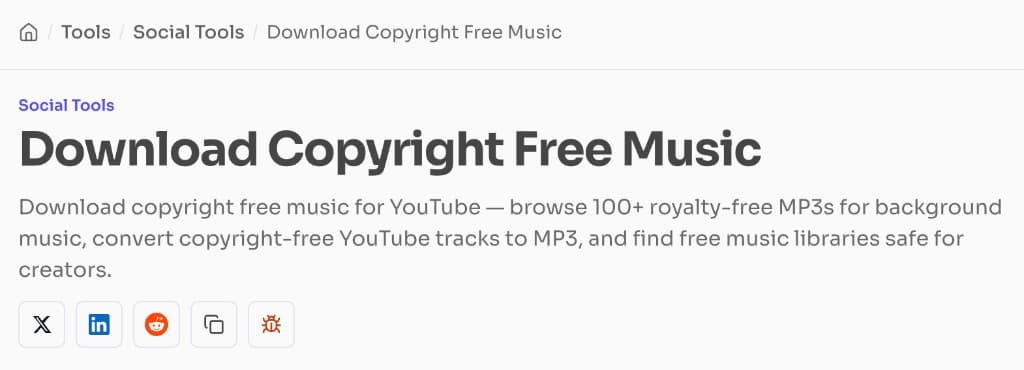
Step 1: Open the copyright free music downloader
Open the copyright free music downloader on FrontendGeek. Stay on Wi‑Fi if you plan to save several tracks for an editing session.
- 2
Step 2: Find a track that fits your video
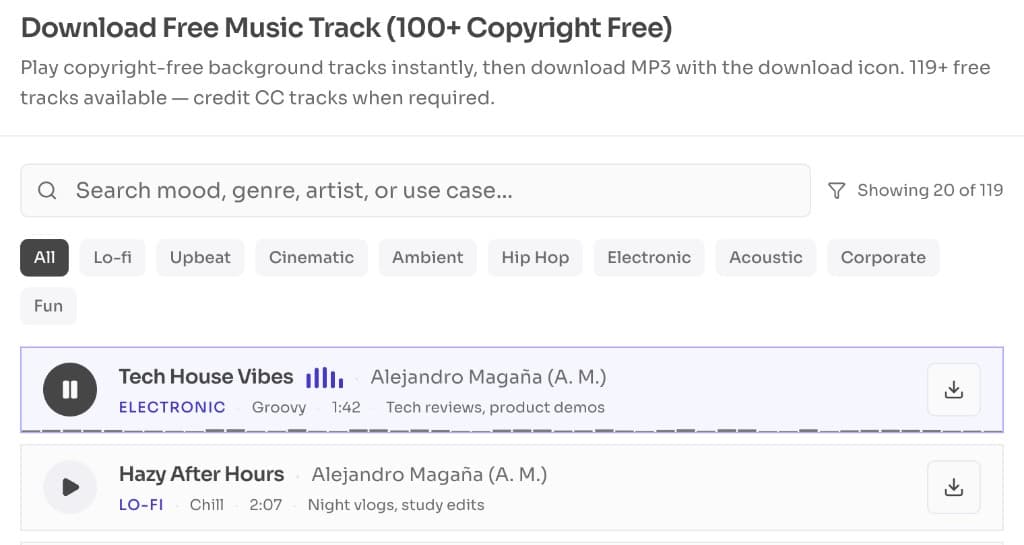
Search or browse by mood, genre, or use-case (vlog, gaming, study, Shorts). Prefer tracks labeled for YouTube or free commercial use. Note any attribution text shown with the track.
- 3
Step 3: Preview before you download
Play a short preview at the volume you will use under voiceover. Check intro energy, loop points, and whether the track competes with speech.
- 4
Step 4: Download the MP3
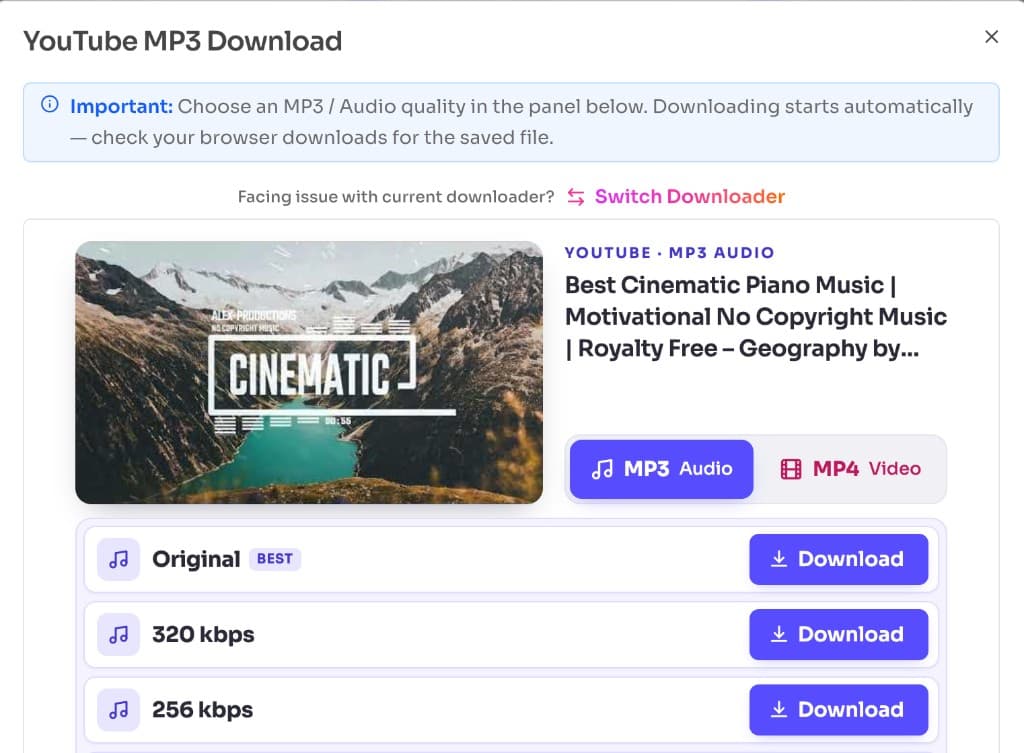
Click download and keep the tab open until Instant Download finishes. Choose an MP3 quality in the panel, then save the file to your browser Downloads folder (or Files on iPhone / Android). Import the MP3 into CapCut, Premiere, DaVinci, or your phone editor.
Try Download Copyright Free Music
Free browser tool · Copyright-safe tracks · Instant Download MP3
Download Copyright Free MusicWhen to Use YouTube to MP3 Instead
Use this guide’s downloader when you are building a claim-safer soundtrack library for new uploads. Reach for a YouTube MP3 extractor when you already have a public video link you own or have permission to keep — for example your own upload, a Creative Commons video, or other permitted audio — and you simply need that audio as an MP3 file.
| Goal | Best approach | Output |
|---|---|---|
| Safe background music for a new video | Browse copyright-free tracks first | MP3 soundtrack |
| Extract audio from a permitted YouTube URL | Paste the link and save MP3 | MP3 from that video |
| Podcast / lecture audio you may keep | Extract from the source URL | Speech-focused MP3 |
| Reuse your own YouTube upload as audio | Extract from your upload URL | MP3 of your track |
- Do not treat random music videos as “copyright free” just because you can extract MP3
- Commercial songs stay protected even after conversion
- Prefer a curated free-music library when the intent is claim-safe background audio
- Only extract from YouTube links you are allowed to save offline
Add Free Music to a YouTube Video Safely
Downloading the file is only half the job. How you use the track in the edit and description matters for claims and channel trust.
Duck under voice
Keep music quieter than narration so Auto claims are less likely to misfire on speech clarity issues.
Trim intros & loops
Cut silence and harsh drops; loop soft beds under long talking segments.
Credit when required
If the license asks for attribution, put the artist / track / link in the description.
Keep license notes
Save a screenshot or text of the license with the MP3 for future audits.
Test on an unlisted upload
Upload unlisted first and check Studio → Copyright for unexpected matches.
One vibe per brand
Reuse 2–3 approved tracks for intros so your channel sounds consistent.
Frequently Asked Questions
Common questions about How to Download Copyright Free Music (MP3 Audio)
- How do I download copyright free music for YouTube videos?
Open FrontendGeek’s Download Copyright Free Music tool, pick a track cleared for YouTube-style reuse, preview it, then Instant Download the MP3 and import it into your editor.
- Is copyright free music the same as royalty free?
Not always. Copyright free usually means free reuse under stated terms. Royalty free often means you do not pay per view, but a license (sometimes paid) still applies. Always read the track terms.
- Will copyright free music avoid Content ID claims?
Tracks that are truly free for YouTube use greatly reduce claim risk, but YouTube’s systems can still match similar audio. Prefer clearly licensed libraries and test with an unlisted upload when unsure.
- Can I use copyright free music on monetized videos?
Only if the license allows commercial / monetized YouTube use. Skip non-commercial Creative Commons tracks if you run ads or Memberships.
- When should I use YouTube to MP3 instead?
Use YouTube to MP3 Converter when you have a public YouTube URL for audio you own or have permission to keep. It extracts MP3 from that link — it does not make commercial music copyright free.
- What format should I download for CapCut or Premiere?
MP3 works in CapCut, Premiere, DaVinci Resolve, Final Cut, and most phone editors. Keep a mid-to-high bitrate for music beds.
- Do I need to install software?
No. Both Download Copyright Free Music and YouTube to MP3 Converter run in your browser with Instant Download after a free sign-in when prompted.
Explore More Guides
 How to Download YouTube Music and Songs for Free — High Quality MP4
 How to Download YouTube Videos for Free: Step-by-Step Guide (2026)
 How to Convert Youtube to MP4 for Free
 How to Extract Audio from YouTube Video — Convert YouTube to MP3
 How to Download YouTube Shorts for Free — Instant HD MP4 Download
 How to Extract YouTube Title and Description Instantly
Or browse the full Tools How to Guide.
Found this guide useful?
Share it with someone learning YouTube downloads